

Table of Contents
You look credible online when you prove you’re real, secure, and consistent. Use fast HTTPS pages, mobile-first design, and a clear brand system across every page. Put your address, phone, and monitored email in the header/footer, then back it up with plain-language shipping, returns, and privacy policies. Add verified reviews, client logos, and specific numbers near key CTAs, plus an About page with real people. Keep checkout friction low with trusted payments, autofill, and upfront totals. Keep going to see the fastest fixes.
Key Takeaways
- Show clear contact details, a real address, and an About page with team credentials to prove legitimacy.
- Keep branding and messaging consistent across pages, ads, and emails to reduce confusion and doubt.
- Publish transparent shipping, returns, and privacy policies with plain-language timelines, fees, and refund terms.
- Display verified social proof like reviews, testimonials, case studies, and recognizable client logos near key CTAs.
- Use secure, fast, mobile-friendly UX with HTTPS, trusted payment options, and a frictionless checkout that shows totals early.
Fix These Credibility Signals First (5-Minute Audit)

If your site looks even slightly “off,” most visitors won’t investigate—they’ll bounce, and you’ll lose the sale. Run a 5-minute credibility audit: scan your header, footer, and contact page for a real address, phone, and email; missing basics tank trust and local SEO.
Check HTTPS, fast load, and mobile layout; slow pages cut conversions and rankings. Confirm Brand consistency: same logo, colors, and business name across pages, meta titles, and social links to reduce confusion signals.
Add Customer testimonials above the fold on key pages, with names, dates, and specific outcomes; vague quotes don’t convert. Finally, fix broken links, outdated copyright, and sloppy typos—each error compounds doubt and exit intent.
Brand Basics That Instantly Build Online Trust
Why do some websites feel trustworthy within seconds while others trigger instant doubt? Your brand basics decide it. Start with a clean logo, readable typography, and a tight color palette—sites with clear visual hierarchy reduce cognitive load and keep visitors moving to key actions.
Lock in Brand consistency by using the same design system across every page element: buttons, icons, imagery style, and tone on headlines. Add proof where it converts: testimonials near offers, recognizable client logos, and third-party badges tied to real standards.
Strengthen Customer engagement with fast, human support signals—live chat hours, response-time promises, and an easy-to-find contact page.
Finally, optimize technical trust: HTTPS, fast load times, and accessible navigation. Trust lifts conversions.
Match Your Messaging Across Site, Ads, and Email
When your site, ads, and emails use a consistent brand voice, you reduce friction and keep visitors moving toward conversion.
You’ll also lift trust signals by keeping offers and claims identical across every touchpoint, so prospects don’t hesitate or bounce.
Match your messaging end-to-end, and you turn higher click-through and lower drop-off into measurable revenue.
Consistent Brand Voice
How often do prospects see one promise on your homepage, a different angle in your ads, and a third tone in your emails? That mismatch triggers doubt fast, and doubt kills conversions.
You build credibility when your Voice tone stays steady across every touchpoint, from hero copy to retargeting headlines to onboarding sequences. Data backs it up: consistent messaging improves recognition and reduces cognitive load, helping visitors decide faster.
Audit your top pages, highest-spend ads, and most-opened emails, then standardize vocabulary, sentence length, and formality level. Use the same “you” language, the same value words, and the same level of urgency.
Brand consistency also strengthens SEO signals by reinforcing topical relevance and entity associations across your site and campaigns.
Unified Offers And Claims
Across your homepage, ads, and email sequences, do your offers and claims match word-for-word where it counts? If your ad promises “20% off today,” but your landing page shows “up to 15%,” you create friction and spike bounce.
Offer consistency reduces confusion, lifts conversion rate, and protects your Quality Score by aligning intent across channels.
Lock down Claim accuracy with a single source of truth: pricing, guarantees, delivery times, and results. Use the same headline, the same core benefit, and the same terms in your CTA, product page, and follow-up emails.
Track mismatches in analytics: high click-through with low on-page conversion signals message drift. When you unify offers and claims, you look credible, rank better, and sell more efficiently.
Social Proof That Looks Real (Reviews, Logos, Numbers)
You build instant credibility online when you show recognizable client logos, verified reviews, and specific numbers that prove results.
You’ll convert more visitors when your metrics are concrete—think “10,000+ orders shipped,” “4.8/5 rating from 1,200 reviews,” or “5 years in business”—and backed by links or screenshots.
You should place these trust signals near key CTAs to reduce doubt and increase sign-ups, calls, and purchases.
Trust Signals From Logos
Because buyers can’t verify your claims at a glance, recognizable logos and “as-seen-in” badges act as instant trust signals that reduce perceived risk and lift conversions. Put partner, payment, security, and platform logos near key CTAs so visitors connect you with familiar brands.
Prioritize Brand recognition: use widely known badges (SSL, Visa/Mastercard, Google, Shopify, Apple Pay) only when you’re legitimately integrated.
Match your Logo design to the page: keep logos monochrome or muted, consistent sizing, and crisp SVGs so they read fast and don’t look spammy.
Add short, verifiable context like “Official Partner” or “Featured in” with links to the source page.
Avoid fake badges; once doubt appears, your trust drops and bounce rises.
Credible Metrics And Milestones
Even if your offer’s strong, visitors still scan for proof that other people have chosen you and gotten results. Make your social proof measurable: show verified review counts, average ratings, response time, and on-time delivery percentage.
Use Customer testimonials that include names, roles, outcomes, and timeframes, not vague praise. Add Expert endorsements from recognizable professionals and link to the source page for validation.
Highlight milestones that reduce purchase anxiety: “10,000+ orders shipped,” “5-year warranty,” “$2.4M saved for clients,” or “ISO-certified since 2021.” Pair numbers with context and update dates so your metrics don’t look stale.
Display logos only when you can prove the relationship. Place proof near pricing, checkout, and lead forms to lift conversions.
Show the Humans Behind the Business (About + Contact)
While your products and pricing may win the first click, visitors often need proof that real, accountable people stand behind the brand. Your About page should quickly answer who you are, what you do, and why you’re qualified—backed by dates, numbers, and outcomes. Add team photos, roles, and credentials to strengthen Employee transparency and reduce perceived risk in seconds.
Make your Contact page frictionless: list a monitored email, phone, business address or service area, and support hours. Add a simple form with response-time expectations and a map if relevant. Highlight Customer stories with named quotes, logos, or case-study links near your mission and contact options.
These human signals improve on-page engagement, boost brand searches, and move visitors from curiosity to confident checkout faster.
Policies That Reduce Risk: Shipping, Returns, Privacy

You reduce cart abandonment and chargebacks when you publish clear shipping timelines, fees, and tracking expectations on every product and checkout page.
You increase conversions when your returns policy is simple, time-bound, and upfront about labels, refunds, and restocking so shoppers know the risk is low.
You earn trust—and protect your brand—when your privacy policy states exactly what data you collect, how you use it, and how customers can opt out or delete it.
Clear Shipping Timelines
When customers know exactly when their order will arrive, they buy with less hesitation and file fewer “where’s my order?” tickets. Clear timelines create Shipping transparency, and that trust shows up in higher conversion rates and fewer support costs.
Put estimated delivery dates on product pages, cart, and checkout, and repeat them in confirmation emails so delivery expectations stay consistent across every touchpoint.
Break timing into processing plus transit, show cut-off times, and name carriers and service levels. If you ship from multiple locations, display location-based ETAs automatically.
Update ETAs when inventory changes, and surface delays before payment to prevent chargebacks.
Add tracking links and proactive status notifications to reduce uncertainty and keep customer satisfaction high post-purchase.
Transparent Returns And Privacy
Clear delivery dates set expectations before purchase; transparent returns and privacy policies protect that trust after checkout and reduce revenue risk. Put return policies where buyers look: product pages, cart, and confirmation emails. State time windows, condition rules, fees, and refund timelines in plain language. When shoppers can predict outcomes, they’re more likely to convert and less likely to dispute charges, cutting support costs.
Pair that clarity with strong privacy protection. Tell customers what data you collect, why you collect it, who you share it with, and how they can opt out or delete it. Use SSL, reputable payment processors, and compliant consent banners.
Publish a single-source policy hub and link it in your footer. Transparency signals legitimacy, boosts SEO trust, and lifts repeat purchases.
Secure Checkout Trust Signals (SSL, Badges, Payments)
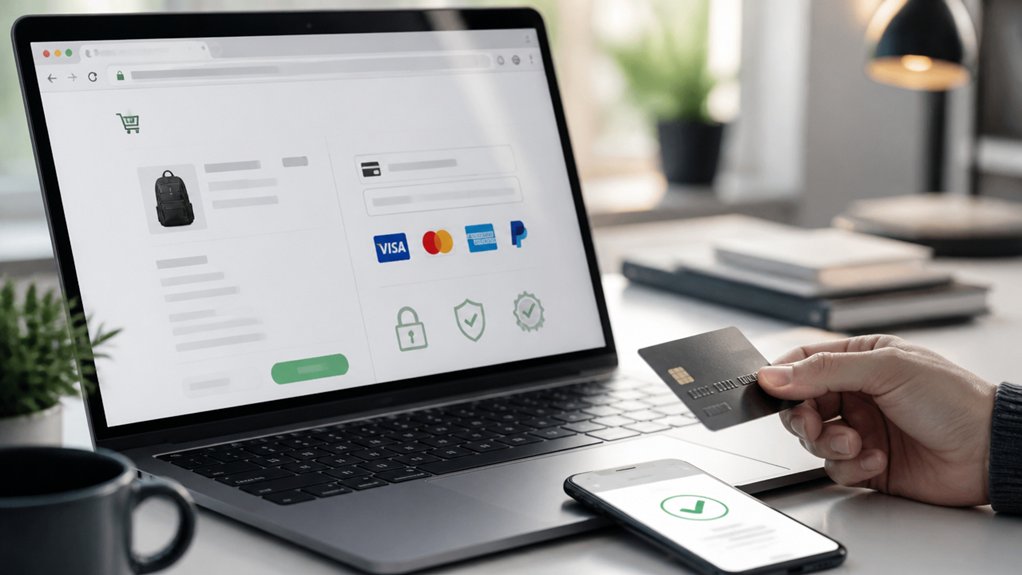
How quickly do shoppers decide whether to trust your checkout? In seconds. If your site doesn’t show HTTPS and a valid SSL certificate, you signal risk, and many buyers abandon before they enter card details. Put the padlock to work: force HTTPS sitewide, eliminate mixed-content warnings, and keep certificates current.
Reinforce confidence with Secure payments options shoppers recognize—Visa, Mastercard, Amex, PayPal, Apple Pay, and Google Pay—displayed near the card fields and order button.
Add Trust badges only when they’re verifiable (PCI DSS, Norton, McAfee) and link them to proof. Match badges to your payment processor and don’t overstack icons, which can look spammy. Clear, consistent trust signals reduce perceived fraud and lift conversion rates at checkout.
Speed + UX Fixes That Stop Trust Leaks
Even if your SSL and badges look perfect, a slow or confusing checkout can still trigger instant doubt and kill conversions. You stop that leak by improving website speed and removing friction at every click.
Aim for sub-2.5s load times; every extra second increases abandonment and lowers revenue. Compress images, defer noncritical scripts, and reduce third-party tags so pages feel instant on mobile.
Then tighten user experience: show shipping and taxes early, keep form fields minimal, enable autofill, and use clear error messages.
Add a sticky cart summary, progress indicators, and guest checkout so users don’t feel trapped.
Finally, make your CTAs obvious, keep one primary action per screen, and retest after changes to confirm lift.
SEO Trust Cues: Titles, Schema, and Review Stars
Why do some listings win clicks before users even see your site? Because searchers scan trust cues: your title, rich results, and review stars.
Write titles that match intent and reduce risk: include your primary service, location, and a proof point (“4.8★,” “Same‑day,” “Since 2012”) without spam.
Add schema markup (Organization, LocalBusiness, Product/Service, FAQ) so Google can validate who you’re and display helpful snippets.
Implement AggregateRating and Review schema only when reviews are on-page and policy-compliant—fake stars tank trust and rankings.
Tie meta descriptions to Brand storytelling: state what you stand for, then back it with outcomes.
Finally, drive Customer engagement by inviting verified reviews and answering FAQs, which boosts CTR, qualified traffic, and conversions.
Active Social Presence: What to Post for Credibility
Although your website closes the sale, your social profiles often earn the initial trust signal, and inactive feeds can lower click-through and lead quality.
Post proof-based content that maps to buyer intent: quick case studies, before/after results, short customer video clips, and behind-the-scenes process walkthroughs that show consistency.
Use repeatable formats (weekly tips, FAQs, myth-busting) to reinforce topical authority and boost Content engagement.
Publish founder POV on industry changes with one actionable takeaway to earn saves and shares.
Highlight milestones, partnerships, and community involvement with measurable outcomes.
For conversion, pin a “start here” post with your value proposition, lead magnet, or booking link.
Drive audience interaction with polls, Q&As, and comment prompts, then respond fast to increase reach and trust.
Top Credibility Red Flags (and Quick Fixes)
Five credibility red flags can quietly cut your conversions—outdated website copy, inconsistent branding across channels, missing social proof (reviews, testimonials, case studies), vague pricing or unclear next steps, and slow or no response to inquiries—and each has a fast fix you can implement today.
Refresh key pages quarterly, align logos, colors, and tone everywhere, and add review widgets plus two proof points per service page.
Replace “contact us” with a specific CTA: book a call, get a quote, or start checkout, and publish starting prices or clear ranges to reduce friction.
Reply within one business hour using templates, autoresponders, and a tracked inbox.
Strengthen Brand storytelling with a crisp origin and outcome narrative, then boost Customer engagement via FAQs, live chat, and post-purchase follow-ups that turn buyers into testimonials.
Frequently Asked Questions
How Long Does It Take to Build Online Credibility From Scratch?
You can build online credibility from scratch in 3–6 months with consistent execution, though 12+ months creates compounding trust.
You’ll accelerate results by publishing weekly, maintaining Brand consistency across your site, listings, and social profiles, and collecting Customer testimonials within your first 30 days.
Track KPIs like review count, conversion rate, and branded search growth.
If you respond to every inquiry fast and showcase proof prominently, you’ll convert sooner.
Does Online Credibility Differ by Industry or Business Model?
Yes—online credibility changes by industry and business model. Picture your site like a storefront: in healthcare, you need credentials, compliance badges, and reviews.
In SaaS, you need uptime stats, case studies, and free trials. You should match industry standards and protect brand reputation with consistent messaging.
Track trust signals—ratings, conversion rate, refund rate, and response time—then A/B test proof points to lift leads and sales.
Should I Hire a PR Agency to Appear More Trustworthy Online?
You should hire a PR agency if you need faster trust signals, media placements, and crisis-ready messaging, but don’t outsource credibility entirely.
You’ll convert more when PR supports Brand transparency, consistent reviews, and strong Customer testimonials.
Ask agencies for benchmarks: earned-media hit rate, domain authority lift, branded search growth, and referral traffic.
If they can’t show measurable KPIs and a clear narrative, you should invest in reviews, content, and support.
How Do I Respond to Credibility Attacks or False Rumors Online?
Respond fast, factually, and consistently: publish a clear correction, share proof (screenshots, dates, policies), and pin it where customers look.
Use Reputation management tools to monitor mentions, document claims, and request takedowns when terms or laws apply.
Run Crisis communication playbooks: assign a spokesperson, align messaging across channels, and update daily until resolved.
Drive conversion by linking to FAQs, third-party reviews, and a contact form.
What Budget Should I Allocate Monthly to Maintain Online Credibility?
You should allocate 3–7% of monthly revenue (or $1,500–$5,000 minimum) to maintain online credibility. Then adjust with Budget planning tied to Credibility metrics.
You’ll fund review monitoring, rapid response, PR, SEO content, and security.
Track rating velocity, sentiment, branded search CTR, share of voice, and complaint resolution time.
If metrics slip, you’ll increase spend 20–30% for 60–90 days to recover trust.
Conclusion
Funny coincidence: you can spend months chasing more traffic, yet a five-minute credibility audit often boosts conversions first. When your brand basics match across your site, ads, and email, and real social proof (reviews, logos, numbers) backs every claim, trust rises fast. Add a human About and clear Contact, fix speed and UX leaks, and reinforce SEO cues like titles, schema, and review stars. Stay active socially, remove red flags, and watch leads convert.
About the Author